Requirements: 6.0+
Overview: inCarDoc Pro – OBD2 car scanner and diagnostics – best doctor for your car: Check Engine codes reader, diagnostics, scanner, monitor and logbook tool: reads real-time and stored diagnostics parameters from ECU of OBD-II compliant cars.
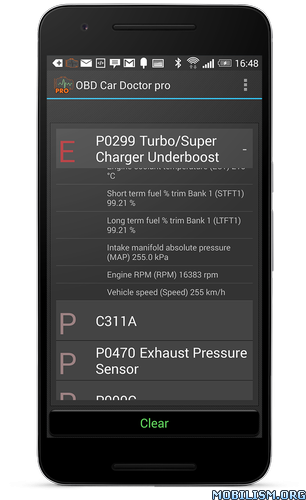
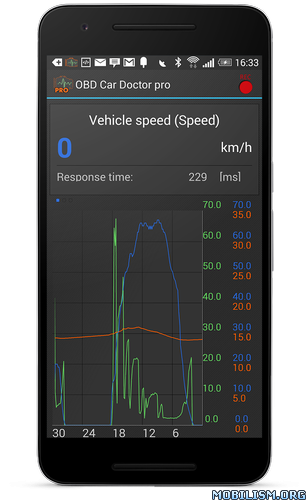
Before purchasing please check the car and OBD2 scanner compatibility with the free version of inCarDocr https://goo.gl/imxGhN
Requires ELM327 or compatible OBD scanner. Supported: OBD-II (Bluetooth, WiFi, Kiwi 3 (BLE), V-Gate iCar 3 (BLE), Veepeak (BLE), Carista, Vinli); GPS-only and Demo modes. Read more at inCarDoc.com Limited functionality available w/o ELM327 possible only in GPS mode: Speed, Altitude
Pro version features:
• no ads
• real time parameters recording
• read & display multiple parameters
• recording parameters in background mode
• view recorded parameters traces
• GPS traces support
• upload to server _http://inCarDoc.com
• extended widgets: fuel economy, acceleration
• overlay to present economy data over any application screen
Car diagnostics
Works as fault codes OBD2 scanner, reads Check Engine (MIL) state, details, related freeze frame data, finds descriptions and clears stored diagnostic trouble codes (DTC). Allows to store and share diagnostics data when looking for a professional service/repair assistance. Please note that app supports only parameters and ECU’s specified with OBD-II standard, that is Engine and Emission systems.
Real-time parameters
Reads real-time engine and vehicle OBD2 parameters PIDs from car’s sensors: speed, rotation (rpm), coolant temperature, pressure, O2 oxygen sensors and multiple other PIDs. Available chart drawing and analog/digital widgets presentation. Please note that exact list of scanned OBD2 parameters depends on your car make/model/year.
Economizer:
Trip Computer mode for presenting and tracking car’s fuel economy/consumption. Presents both in-drive (instant and average MPG) as well as per trip, per day and other statistics. Please note, that feature available when appropriate OBD2 economy parameters (MAF or MAP+IAT+RPM) are supported in your car. For correct calculations you may need to enter Engine displacement (in cubic cm) and volumetric efficiency (in %, the default is 80).
Other features:
• logbook notes: fueling, service records, car maintenance, diagnostics
• GPS parameters: speed, altitude
• register and upload data to web
• console mode: for advanced users, direct OBD2 and ELM327 commands sending
• use custom configurations for non-standard parameters and protocols
Avoid!!! simultaneous running of multiple OBD-II reading apps, be sure that other apps does not keeping live Bluetooth/WiFi connection via ELM327 OBD2 scanner.
Required permissions:
• Device & app history
Used to self- identify application when at background
• Location
Extra GPS parameters: GPS speed, altitude, position for fueling and service search
• Photos/Media/Files
Store and read “Logbook” and Debug data as direct user’s actions
• Other
Bluetooth related – communication with external OBD2 scanner
Internet related – publishing “Logbook” records to server as direct user’s actions
Drawing over other apps – presenting economy and selected parameters over other app’s screens
Warning!!! There are reports on issues when using some cheap “clones” of ELM327 (mostly marked as v2.1)! Read more at our forum https://goo.gl/9qiBSv
You are always welcome @ our site http://inCarDoc.com
Thank you!!!
What’s New
• Redesigned interface
• New fuel consumption insights
• Core functionality is available
• Diagnostic feature availability (PRO without any limited)
• More improvements are coming
• Performance and stability improvements
.apks Bundle Installation:
SAI Instructions: [no root]
1. Download and install latest SAI app (Split APK Installer) – https://github.com/Aefyr/SAI/releases
2. Download this .apks archive app;
3. Install and Open SAI / Choose “Install APKs” button / Find and Select downloaded .apks archive app;
4. Wait for install and done. Enjoy!
Lucky Patcher Instructions: [no root]
1. Download and install latest Lucky Patcher app;
2. Install and Open Lucky Patcher and choose ‘Rebuild & Install’;
3. Find and Select downloaded this .apks archive app;
4. Wait for install and done. Enjoy!
PS: Make sure after open SAI or Lucky Patcher you allowed STORAGE Permission and Install Unknown Apps Permission!
★ Untouched Paid apks Bundle with Original Hash Signature
★ Certificate MD5 digest: 06ebe60757b561ed5ee0336dd8e2a624
★ No changes were applied
➡ Languages: “En” “Es” “Ru” “De””Fr” “Ua” “IT” “HI” “BN” “GU” “KN” “MR” “TA” “TE”
➡ CPU architectures: arm64-v8a, armeabi-v7a
➡ Screen DPIs: 160dpi, 240dpi, 320dpi, 480dpi, 640dpi
This app has no advertisements
More Info:
https://play.google.com/store/apps/details?id=com.pnn.obdcardoctor_fullDownload Instructions:
.apks Bundle:arm64-v8a, armeabi-v7a
https://mega4upload.net/tdifln3k7viw
mirror:
https://www.up-4ever.net/cyjfkeenemgt
https://10drives.com/b/MkrbkUFakOkEkkyxUr
https://upfiles.com/FQoAD9xm
Standalone Android Package Arm64-8A(No SAI needed):
https://mega4upload.net/ml2ywbkwxbuw
Mirrors:
https://www.up-4ever.net/oc1xx0e2o1ro
https://10drives.com/b/MkrbkUFakOkEkkyxda
https://upfiles.com/G04gh.